
Release archive Complete version record
AI Stripper changelog.
Every retained release, from the original EXIF Stripper utility through the current signed AI Stripper build.
- Current
- v2.3.2
- Released
- September 11, 2026
- Tracked versions
- 19
- Publisher
- Sputnik Digital LLC
Current release September 11, 2026
Version 2.3.2
-
01
Editable AI rewrite fields
Closing AI review returns focus to the workspace. Accepted values remain editable and stay attached to the correct source image.
-
02
Visible orientation safeguard
Same-format processing stops when removing EXIF orientation would change how the image appears. Format conversion normalizes it instead.
-
03
Transparent PNG handling
RGB and grayscale PNG color-key transparency now survives WebP conversion and uses the selected background during JPG conversion.
-
04
Cleaner provider rendering
Metadata-free AI analysis copies also discard inherited JPEG comments before a request is sent.
-
05
Safer startup and scanning
Invalid settings value types fall back cleanly, and JPEG marker scanning uses a bounded native byte search.
-
06
Updated user manual
The bundled 10-page PDF documents the new editing behavior and orientation safeguard.
AI review focus repair September 4, 2026
Version 2.3.1
-
01
Review focus restored
Apply, Skip, Stop, and manual review dismissal release the modal grab and return keyboard focus when the review owned it.
-
02
Background focus respected
Closing an inactive review does not force AI Stripper in front of another application.
Per-file output names September 3, 2026
Version 2.3.0
-
01
Per-file output names
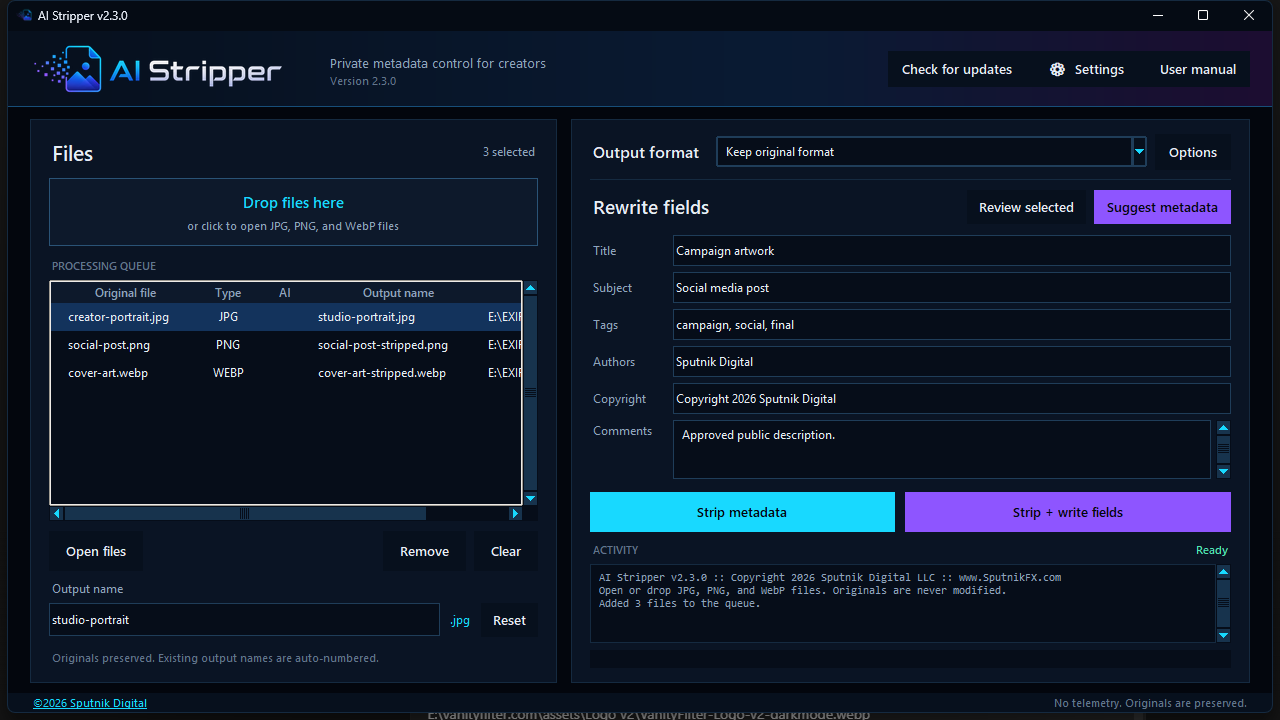
Select a queued image and edit Output name. Both Strip metadata and Strip + write fields use that file's chosen name.
-
02
Originals stay untouched
Outputs stay beside their sources. Existing filenames receive -2, -3, or the next available number, including when a chosen name matches the original.
-
03
Queue previews and reset
The queue previews output names and scrolls horizontally. The export format supplies the extension; Reset or an empty name restores the -stripped default.
-
04
Updated user manual
The 10-page PDF includes the new naming controls, validation rules, and examples. It ships with the signed installer.
Saved-key indicator August 27, 2026
Version 2.2.6
-
01
Masked saved-key indicator
Settings now shows masked dots when Windows Credential Manager contains a key for the selected AI provider.
-
02
Credential-safe placeholder
The mask never becomes a replacement credential. Saving Settings without a new key leaves the stored value unchanged.
-
03
Normal key replacement
Focusing the masked field clears the placeholder so a replacement can be entered, while Clear saved key keeps its existing behavior.
Windows and AI review fixes August 27, 2026
Version 2.2.5
-
01
Visible accepted suggestions
Accepted Title, Subject, Tags, and Comments now appear immediately in the main rewrite form for a single selected image.
-
02
Native Windows window
The fragile borderless main window was replaced with a native application window styled with a dark title bar.
-
03
Taskbar grouping corrected
The running app now groups by its installed executable instead of a custom identity that could differ from an older pinned shortcut.
-
04
Background activation fixed
A second launch brings a hidden background window forward without using the minimized-window restore path.
Window activation fix August 14, 2026
Version 2.2.4
-
01
Packaged window activation
A second launch now finds the borderless application through the Windows top-level window list, restores it, and brings it forward.
-
02
Single-window verification
Packaged testing confirms the second launcher exits while the original window handle remains active.
Taskbar integration August 14, 2026
Version 2.2.3
-
01
Normal taskbar presence
Corrected the custom window style so Windows treats AI Stripper as a normal taskbar application instead of a tool window.
-
02
Stable application identity
Added one AppUserModelID to the process, Start menu shortcut, and optional desktop shortcut for consistent taskbar grouping.
-
03
Single-instance guard
Added a named Windows mutex so another launch exits instead of creating a duplicate interface.
OpenAI connection fix August 14, 2026
Version 2.2.2
-
01
Interrupted connection retries
OpenAI suggestions now retry two short connection failures before stopping.
-
02
Idempotent requests
Every retry uses the same idempotency key so a reset does not become a separate suggestion operation.
-
03
Clear failure message
Raw Windows socket errors are replaced with direct guidance after all three attempts fail.
Upgrade reliability August 14, 2026
Version 2.2.1
-
01
Locked application recovery
Setup can force-close a hidden older AI Stripper process when it keeps the installed executable locked.
-
02
Bounded process handling
The installer close filter targets AI Stripper without restarting unrelated applications.
Optional AI Suggestions August 12, 2026
Version 2.2.0
-
01
Optional AI Suggestions
Added per-image Title, Subject, Tags, and Comments suggestions through OpenAI or Google Gemini using the user's own provider API key.
-
02
Supported vision models
Added GPT-5.6 Luna, GPT-5.4 mini, GPT-5.4 nano, Gemini 3.6 Flash, and Gemini 3.5 Flash-Lite choices.
-
03
Every-run privacy disclosure
The app requires approval every time Suggest metadata starts. The optional feature remains disabled until a provider key is configured and the user starts it.
-
04
Sanitized provider requests
Each request contains one metadata-free JPEG rendering resized to a maximum of 1600 pixels. It excludes the source filename, folder path, source metadata, Author, Copyright, and other rewrite values.
-
05
Per-image review
Users can edit, apply, skip, stop, and follow queue status before suggested fields are used. Author and Copyright remain under direct user control.
-
06
Credential Manager storage
Provider API keys now live in Windows Credential Manager instead of the application settings file.
-
07
Synchronized-folder batch fix
Fixed intermittent WinError 32 failures when converting batches inside Dropbox and other actively synchronized folders.
-
08
Direct verified output
Removed hidden sibling temporary outputs and changed conversion to verify completed bytes before writing the final collision-safe file.
WebP Options fix August 6, 2026
Version 2.1.2
-
01
WebP Options lockup fixed
Fixed a Windows Z-order bug that could place the WebP conversion dialog behind the main window while it held the modal input grab.
-
02
Modal ownership corrected
Options and Settings dialogs now receive explicit Windows ownership and foreground activation.
-
03
Regression protection
A Windows UI test now verifies that the conversion dialog stays visible above the application while it owns the modal input grab.
-
04
C2PA coverage verified
Release tests now explicitly cover JPEG APP11, PNG caBX, and WebP C2PA manifest carriers while retaining the documented limits of pixel-based soft bindings.
Administrator installer release July 28, 2026
Version 2.1.1
-
01
Administrator-ready installer
The Windows installer now requests administrator permission before installation.
-
02
Program Files by default
The standard destination moved from the current user Local AppData folder to the system Program Files directory.
-
03
Protected-folder fix
Selecting a protected Program Files directory on another drive no longer fails with an access-denied error.
-
04
Updated documentation
The user manual and installer guidance now describe the permission model accurately.
Interface and installer release July 28, 2026
Version 2.1.0
-
01
Visible conversion controls
JPG, PNG, and WebP conversion sliders became substantially easier to see.
-
02
Saved defaults
A Settings control now stores output format, conversion choices, author, and copyright for the current Windows user.
-
03
Dark native windows
The main window and application modals gained app-rendered dark title bars.
-
04
Installed workflow
The release added a signed Windows installer, stable upgrade identity, signed uninstall support, a Start menu group, and an optional desktop shortcut.
-
05
Packaged documentation
The application, PDF manual, changelog, and third-party notices ship inside the installed package.
AI Stripper launch July 28, 2026
Version 2.0.0
-
01
New product identity
The application was renamed from EXIF Stripper to AI Stripper and received the Clean Frame visual system.
-
02
WebP support
The release added lossless same-format WebP metadata stripping and rewriting.
-
03
Image conversion
JPG, PNG, and WebP conversion arrived with format-specific controls and clear re-encoding notices.
-
04
Modern file workflow
Multi-file selection and native Windows drag and drop replaced the managed Inputs and Outputs folder workflow.
-
05
Original preservation
Outputs now save beside the source with collision-safe -stripped naming. Originals are preserved.
-
06
Release systems
The rebuild added notification-only update checks, a 1280 by 720 interface, a dark PDF manual, signed one-file packaging, and SHA-256 release manifests.
EXIF Stripper July 7, 2026
Version 1.0.4
-
01
PNG compatibility fields
Added PNG XMP, iTXt, and tEXt compatibility fields while retaining the EXIF-based rewrite path for JPG and PNG.
EXIF Stripper June 28, 2026
Version 1.0.3
-
01
Product identity
Updated the activity text and startup message with the Sputnik product name, copyright notice, and SputnikFX.com.
EXIF Stripper June 27, 2026
Version 1.0.2
-
01
Production layout
Reworked the application around a smaller window, expanded the metadata form, moved the log, removed decorative dividers, and added dark scrollbars.
EXIF Stripper June 27, 2026
Version 1.0.1
-
01
First interface update
Added the Windows icon, scrolling, and a tighter first-release layout with improved logo placement.
Original release June 27, 2026
Version 1.0.0
-
01
JPG and PNG stripping
Released metadata removal for JPG, JPEG, and PNG without changing encoded pixels.
-
02
Controlled fields
Added optional Title, Subject, Tags, Comments, Authors, and Copyright values with strip-only and strip-and-rewrite workflows.
-
03
Original folder workflow
Processed an Inputs folder into verified Outputs and packaged the Python runtime and required libraries into one executable.