AI skin smoothing for video.

VanityFilter

One dial to camera-ready. No plugin, no subscription, no cloud.

VanityFilter finds every face in your footage, builds a mask that covers skin and nothing else, and smooths only that. Eyes stay sharp. Lips stay lips. Pores survive. It runs on your machine, offline, and the license is yours for good.

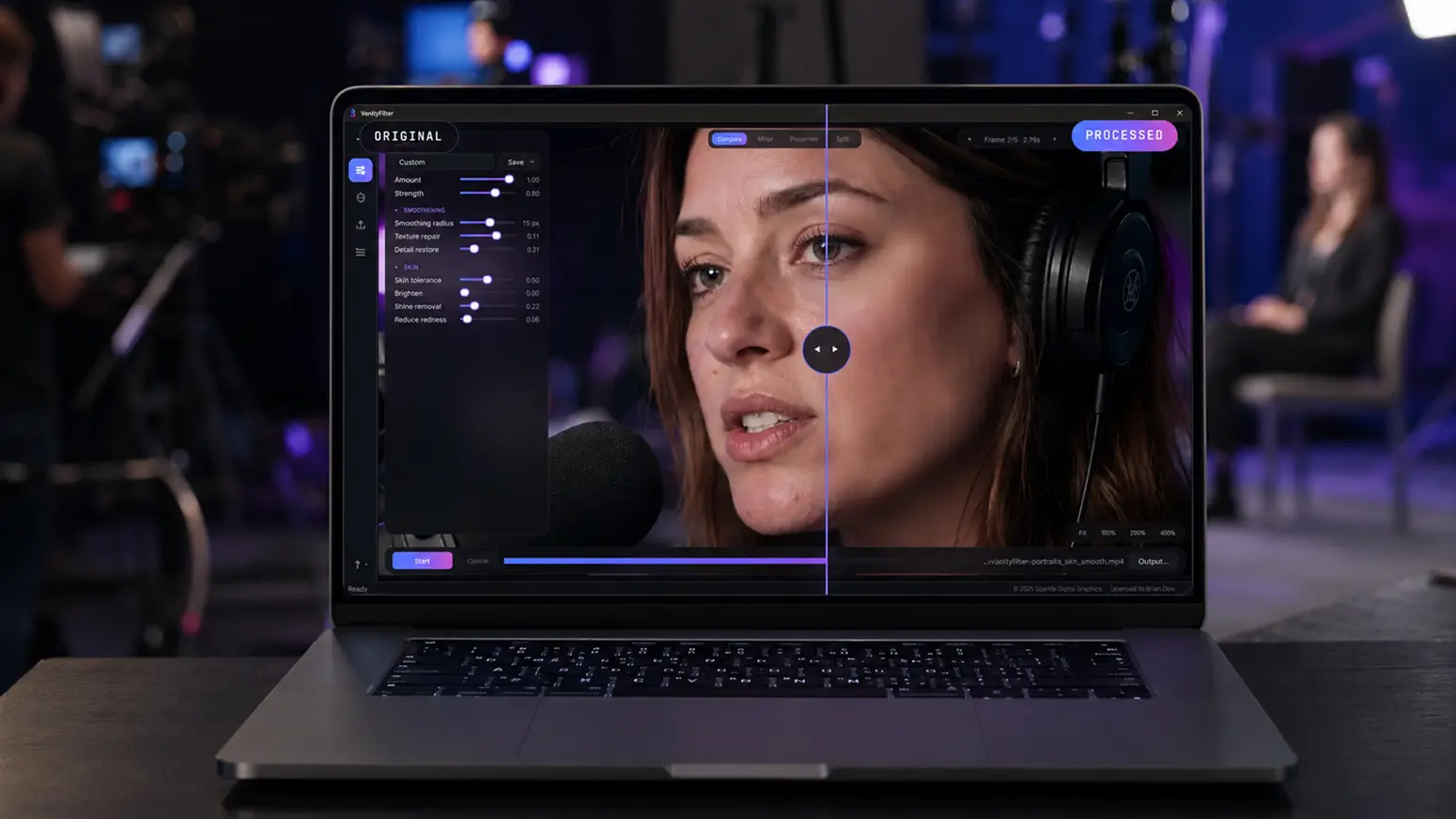
The VanityFilter interface: a full-bleed video preview with floating adjustment panels and an icon rail
Buy now: $24.95

Code CCCP applies $5 off automatically. Normally $29.95, list $49. Windows 10 / 11 · v2.0.0

Faces per frame Up to 5
Landmarks per face 478
Processing 100% offline
License One time, forever
Current build v2.0.0
01 The proof

Drag it yourself. That is the whole pitch.

Most skin smoothing looks like skin smoothing. Ours is built to survive a close-up: an edge-preserving filter on a skin-only mask, with texture put back on purpose.

The trick is what the mask protects. Eyes, brows, and lips are cut out of it. A per-person segmentation gate keeps it off hair, shirts, and the wall behind you. Then the effect is blended, not pasted, and a detail pass restores the pores the filter softened. The result reads as a good night's sleep, not a filter.

  • Skin-only masking
  • Eyes, brows, lips protected
  • Texture repair
  • Shine removal
  • Redness reduction
  • Frame-to-frame stability
A presenter under hard light before and after VanityFilter skin smoothing
Hard light Unforgiving key light, shine on the forehead, and no makeup chair in sight.
A newscaster before and after VanityFilter skin smoothing on the Heavy preset
Heavy preset Pushed hard on purpose. Still skin, still a face, no wax figure.

Who it is for.

Anyone whose face is the product. If you are lit by one lamp and shooting in a resolution that shows every pore, this was built for you.

Crew 01

YouTubers and streamers

You shoot in 4K under a light that shows everything. Run the footage through once before you edit and stop apologizing to your own face in the timeline.

Crew 02

Podcasters

Two, three, five people around a table, all lit by the same unkind lamp. VanityFilter tracks up to five faces per frame, including the ones turned away.

Crew 03

Editors

Export ProRes 422 HQ that Premiere cuts natively, or export the mask as a grayscale matte and drive your own grade with a Track Matte Key.

Crew 04

Anyone on camera

Interviews, courses, webinars, real estate walkthroughs, corporate talking heads. If a face is on screen, it can look like you slept.

Four views of every frame.

You never have to trust it. The preview browser shows the source, the mask it built, the processed result, and a split, at any frame you pick, re-rendering live as you drag a slider.

OS Windows 10 / 11 (64-bit)
Input MP4 · MOV · AVI · MKV
Output H.264 MP4 · ProRes 422 HQ MOV
Faces per frame Up to 5, profiles included
Audio Preserved from the source
Internet Not required, fully offline
GPU Optional, speeds up H.264 export
License Offline key · 1 user · 2 machines
02 The build

Version 1.0 to 2.0 in five days.

VanityFilter 1.0 shipped on July 8, 2026. Version 2.0, with an all-new interface, shipped on July 13. Five days, on a product that already had paying customers.

That pace is the point of this page. Sputnik Digital Graphics does not just design software, we build and ship it: the computer vision engine, the interface, the licensing, the installer, the storefront, and the launch. VanityFilter is roughly 3,800 lines of Python across fifteen modules, gated by 73 tests, packaged into a single Windows installer with every model and codec inside it.

Version 2.0 was an interface release, and an honest one: the engine did not change, so every preset from 1.3 renders identically. What changed is the room to work. The preview went full bleed behind floating panels, and on a 768p laptop the image is about two and a half times taller than it was. Three new controls landed with it: a master Amount dial, shine removal, and redness reduction.

  • 1.0 shipped 07.08.2026
  • 2.0 shipped 07.13.2026
  • ~3,800 lines of Python
  • 73 tests, all passing
  • 20 MB of models bundled
  • Zero runtime dependencies
Read the full case study

Every system on the stack.

Nothing here is a wrapper around somebody else's API. The engine, the interface, the licensing, and the release pipeline were all built in house.

Sys 01

The core

A Windows desktop application and a scriptable command line twin, sharing one engine so both render identically.

  • Python 3.11.9 Application core, processing pipeline, and build tooling
  • PySide6 6.11.1 (Qt 6) The full-bleed preview interface, floating panels, and custom-drawn icon rail
  • NumPy 2.4.6 Vectorized per-pixel math on every frame
  • pytest 73 tests across the I/O, mask, smoothing, licensing, and update modules
Sys 02

Computer vision

Three models ship inside the installer, about 20 MB of them, so the app never calls home to think.

  • MediaPipe 0.10.35 Tasks API Face Landmarker: 478 landmarks per face, up to five faces per frame
  • YuNet (ONNX) Second detector that catches the turned and profile heads the landmarker drops
  • Selfie multiclass segmenter Per-person skin gate, so the mask lands on skin instead of a beige shirt
  • OpenCV 5.0.0.93 Edge-preserving bilateral filtering, mask morphology, and frame I/O
Sys 03

Video pipeline

One ffmpeg pass in, one out. Original audio preserved, no temp files, no transcode round trip.

  • FFmpeg, driven directly Raw BGR frames piped in, muxed with the source audio in a single pass
  • NVENC with fallback GPU H.264 encode when a working NVIDIA card is actually proven, libx264 when not
  • ProRes 422 HQ 10-bit 4:2:2 with PCM audio, so Premiere cuts it natively
  • Mask matte export The mask as a grayscale video for Track Matte Key workflows
Sys 04

Licensing

Copy protection with no activation server, because a creator on a deadline should never be blocked by someone else's downtime.

  • Ed25519 signatures Keys signed offline with a private key, verified in-app against the bundled public key
  • Public key only The app can verify a license but cannot forge one
  • No phone home The only network call in the product is an optional update check
  • One user, two machines Desktop and laptop, no seat juggling
Sys 05

Packaging

One command turns source into a product: executable, installer, bundled models and codecs, manual, and license notices.

  • PyInstaller Onedir build producing the app and the CLI from one shared collection
  • Inno Setup 6 LZMA2 installer with a stable upgrade identity, so updates land in place
  • Generated manual The PDF user manual is rebuilt from code on every release
  • License compliance Qt, FFmpeg with its source offer, and every model license bundled
Sys 06

How it got fast

The speed came from method, not heroics: a written interface contract first, modules built in parallel against it, tests as the gate.

  • Contract-first design Every module signature agreed in writing before a line was implemented, so the pieces composed without rework
  • AI-assisted, human-directed Parallel implementation against that contract, the same approach behind our other in-house tools
  • Measured, not guessed Optimizations benchmarked before shipping, and the rejected ones documented with their numbers
  • A release runbook Versioned builds, a rollback path, and a post-release checklist
Launch window Code CCCP is live

One payment. Yours for good.

No subscription, no seats, no cloud credits. Buy it through Sputnik and code CCCP takes $5 off at the door.

Code CCCP

Lifetime license

$29.95 $24.95

One-time payment. List price $49.

  • Desktop app and command line tool
  • 1 user, 2 machines
  • Key delivered by email
  • Works fully offline
  • User manual included
Buy now: $24.95

Code CCCP is applied for you at the store, no typing. Secure PayPal checkout with PayPal, Venmo, or any card. No account required.

30-day demo

Try it first

$9.95

The full app, for 30 days.

  • Every feature unlocked
  • Multi-face detection
  • Works fully offline
  • Upgrade anytime, no reinstall
Start the demo

Same checkout. The key simply stops after 30 days.

Need software of your own?

VanityFilter is what happens when this studio builds for itself: engine, interface, licensing, installer, and storefront, start to finish. If you have a product that needs the same treatment, open a channel.

Start your build